@EtoDemerzel
2017-11-15T16:59:14.000000Z
字数 10701
阅读 3387
机器学习week7 ex6 review
吴恩达 机器学习
这周使用支持向量机(supprot vector machine)来做一个简单的垃圾邮件分类。
Support vector machine
1.1 Example dataset 1
ex6.m首先载入ex6data1.mat中的数据绘图:
%% =============== Part 1: Loading and Visualizing Data ================% We start the exercise by first loading and visualizing the dataset.% The following code will load the dataset into your environment and plot% the data.%fprintf('Loading and Visualizing Data ...\n')% Load from ex6data1:% You will have X, y in your environmentload('ex6data1.mat');% Plot training dataplotData(X, y);fprintf('Program paused. Press enter to continue.\n');pause;
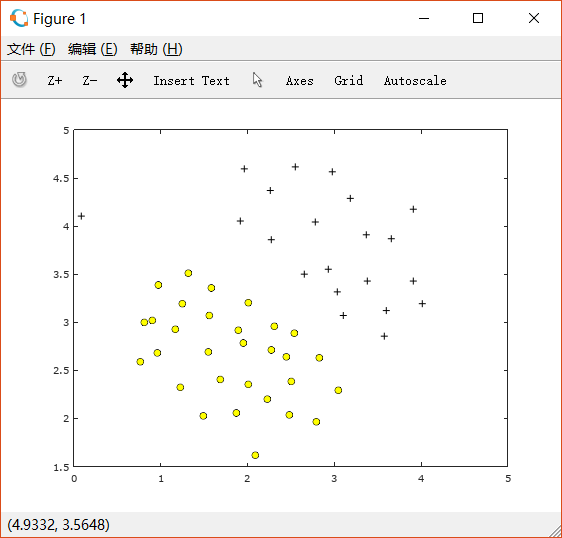
接着用已经写好的SVM来训练,取C=1:
%% ==================== Part 2: Training Linear SVM ====================% The following code will train a linear SVM on the dataset and plot the% decision boundary learned.%% Load from ex6data1:% You will have X, y in your environmentload('ex6data1.mat');fprintf('\nTraining Linear SVM ...\n')% You should try to change the C value below and see how the decision% boundary varies (e.g., try C = 1000)C = 1;model = svmTrain(X, y, C, @linearKernel, 1e-3, 20);visualizeBoundaryLinear(X, y, model);fprintf('Program paused. Press enter to continue.\n');pause;
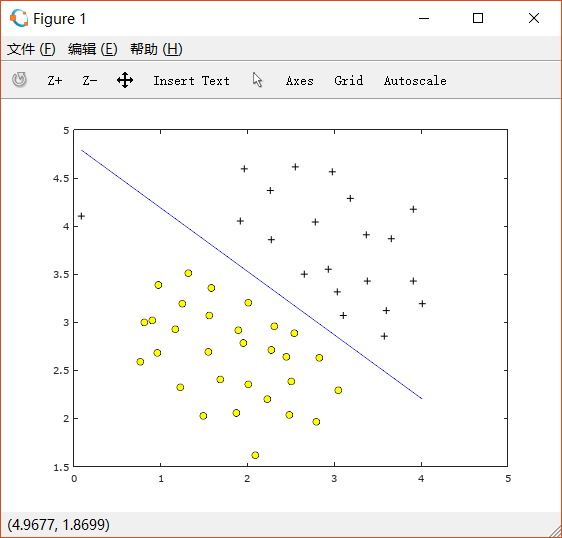
可以看到此时左上角的一个十字点被错误地分类了。
如果改变C=100,则得到如下图形:
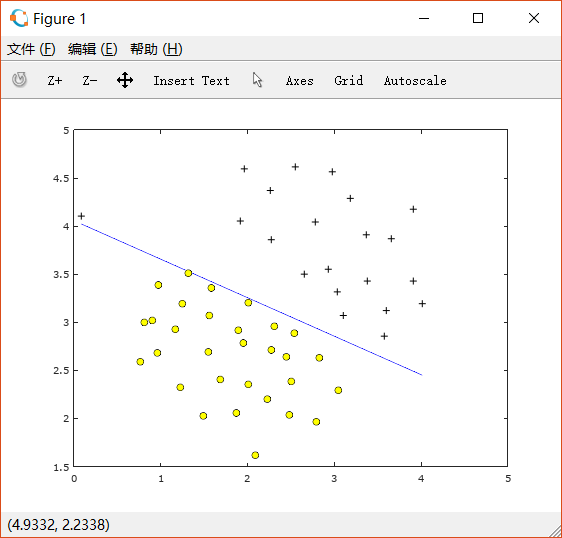
此时training example中的所有点都被正确分类了,但是这条线很显然并不正确。
1.2 SVM with Gaussian Kernels
1.2.1 Gaussian kernel
Gaussian kernel function:

求两点距离在MATLAB中可以直接使用pdist函数,在Octave中如果下载了Octave-forge中的statistics包也可以使用。这里是Octave下载package的方法。
故完成gaussiankernel.m代码如下:
function sim = gaussianKernel(x1, x2, sigma)%RBFKERNEL returns a radial basis function kernel between x1 and x2% sim = gaussianKernel(x1, x2) returns a gaussian kernel between x1 and x2% and returns the value in sim% Ensure that x1 and x2 are column vectorsx1 = x1(:); x2 = x2(:);% You need to return the following variables correctly.sim = 0;% ====================== YOUR CODE HERE ======================% Instructions: Fill in this function to return the similarity between x1% and x2 computed using a Gaussian kernel with bandwidth% sigma%%x = [x1';x2']; % make x1 x2 as row vectors and put together as a matrixdis = pdist(x); % using the pdist function in statistics packagesim = exp(-dis^2/(2*sigma^2));% =============================================================end
1.2.2 Example Dataset 2
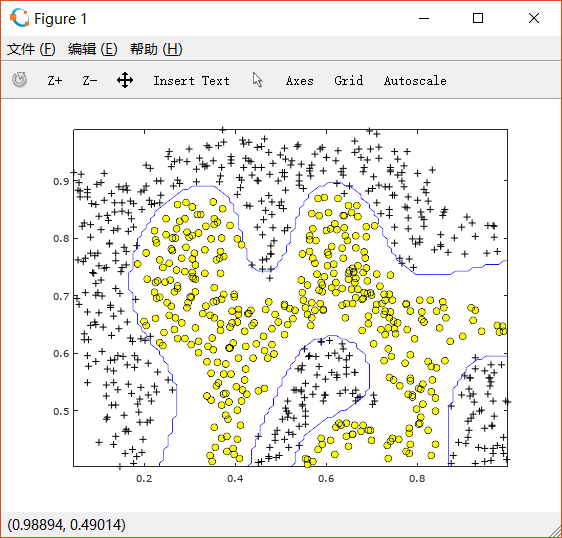
根据刚刚完成的求Gaussian Kernel的函数,利用已经写好的SVM可以对ex6data2.mat中的数据进行分类。
ex6.m先对数据进行可视化如下:
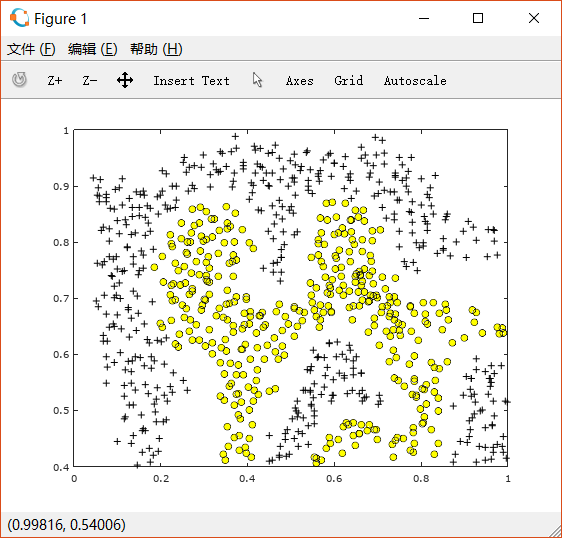
经过使用了RBF kernel的SVM训练后,可以画出如下边界:
1.2.3 Example Dataset 3
需要使用交叉验证集求出最合适的C和sigma。
C和sigma的验证范围都是[0.01 0.03 0.1 0.3 1 3 10 30], 也就是说需要进行64次计算,来得到最合适的C和sigma,并用于对训练集的计算中。
完成函数dataset3Params.m如下:
function [C, sigma] = dataset3Params(X, y, Xval, yval)%EX6PARAMS returns your choice of C and sigma for Part 3 of the exercise%where you select the optimal (C, sigma) learning parameters to use for SVM%with RBF kernel% [C, sigma] = EX6PARAMS(X, y, Xval, yval) returns your choice of C and% sigma. You should complete this function to return the optimal C and% sigma based on a cross-validation set.%% You need to return the following variables correctly.C = 1;sigma = 0.3;% ====================== YOUR CODE HERE ======================% Instructions: Fill in this function to return the optimal C and sigma% learning parameters found using the cross validation set.% You can use svmPredict to predict the labels on the cross% validation set. For example,% predictions = svmPredict(model, Xval);% will return the predictions on the cross validation set.%% Note: You can compute the prediction error using% mean(double(predictions ~= yval))%train_values = [0.01 0.03 0.1 0.3 1 3 10 30];sigma_values = [0.01 0.03 0.1 0.3 1 3 10 30];for i=1:length(train_values)for j=1:length(train_values)C = train_values(i);sigma = train_values(j);model = svmTrain(X, y, C, @(x1, x2) gaussianKernel(x1, x2, sigma));predictions = svmPredict(model, Xval);predictions_error(i,j) = mean(double(predictions ~= yval));endendmm = min(min(predictions_error));[i j] = find(predictions_error == mm);C = train_values(i)sigma = train_values(j)% Answer is C = 1 and sigma = 0.1% =========================================================================end
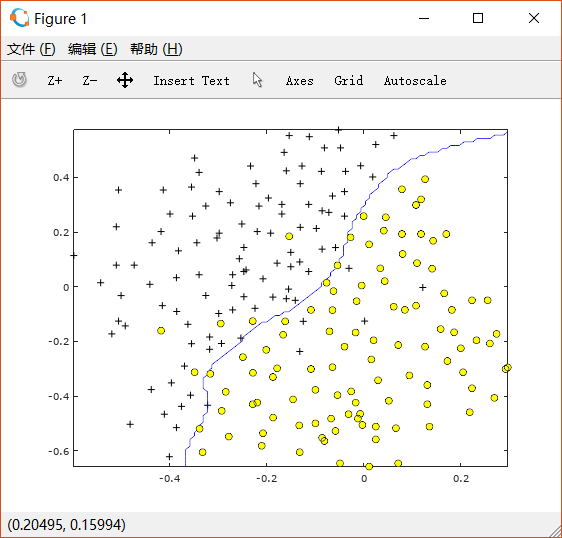
最后得到使得cross validation error最小的C和sigma分别为1和0.1。
绘制训练集散点图如下:

使用上述C和sigma,求出边界如下图:
2. Spam classification
使用SVM进行垃圾邮件分类。
表示是垃圾邮件, 表示不是垃圾邮件。同时还需要将每封邮件转换成一个特征向量 。
数据集来自SpamAssassin Public Corpus。这次简化的分类中,不考虑邮件的标题,只对正文进行分类。
2.1 Preprocessing Emails
需要对邮件中的内容进行Normalization:
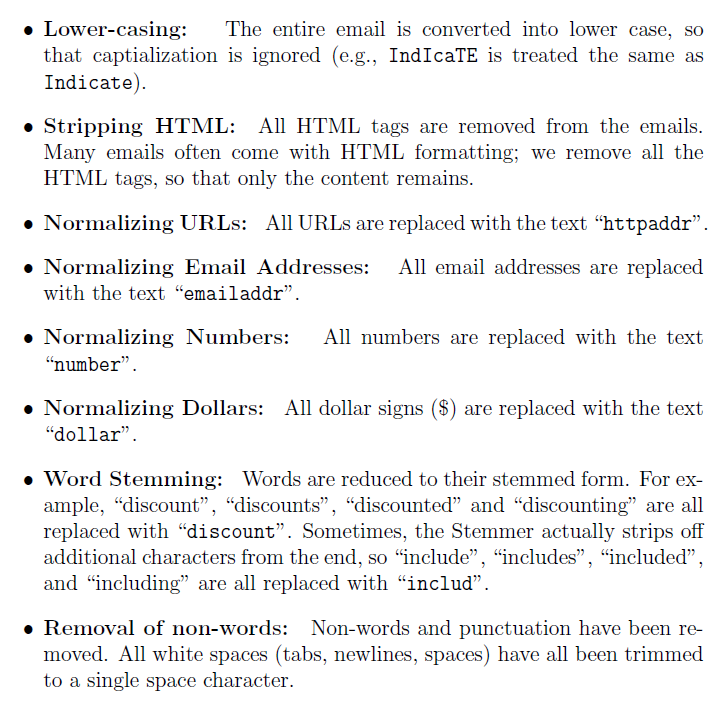
即将正文中所有字母换成小写、去掉所有HTML的tag、把所有URL替换成"httpaddr"、所有Email地址替换成"emailaddr",所有数字替换成"number"、所有美元符号 替换成"dollar"、单词词根化、去掉非单词字符(包括标点符号,tab newline spaces均用一个空格替代)。
例如一封邮件本来含有如下内容:
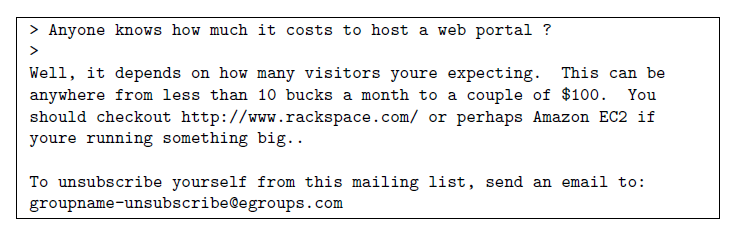
经过上述处理后,则变为如下内容:

2.2 Vocabulary list
在这个简化的垃圾邮件分类中,我们只选择了最常用的单词。因为不常用的词汇只在很少一部分邮件中出现,如果增加它们作为feature,可能会导致overfitting。
在文件vocab.txt中包含了全部单词表,部分截图如下:
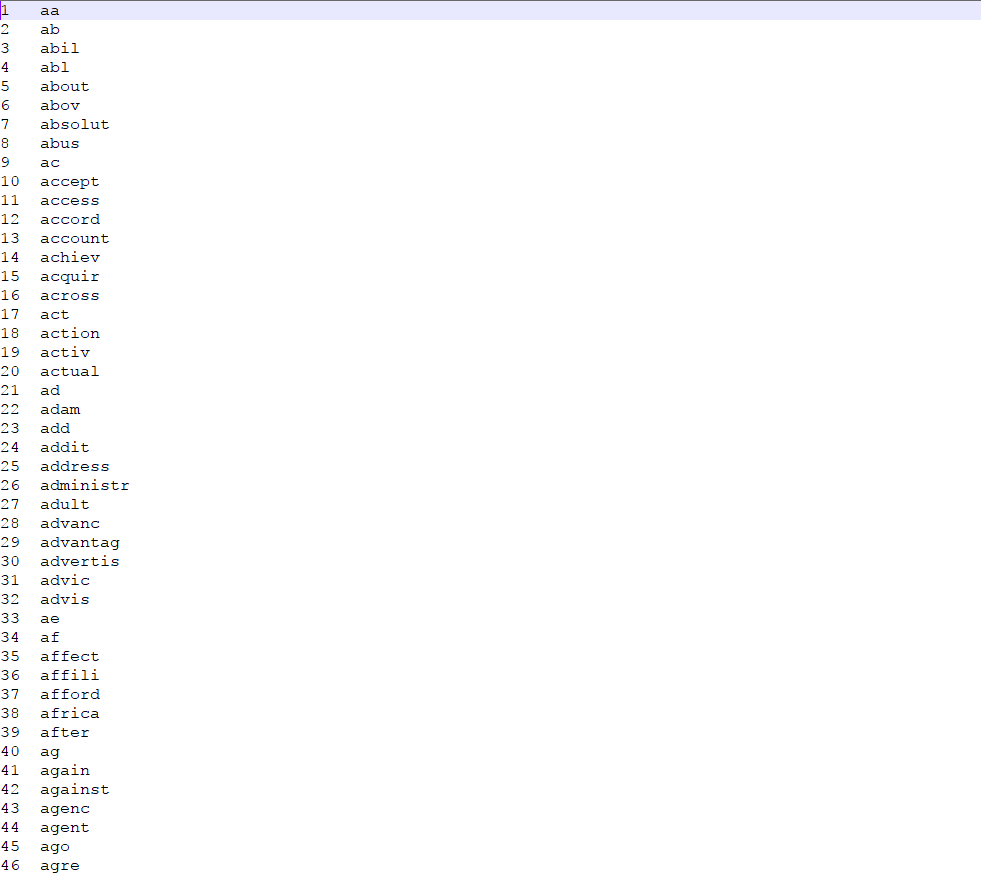
这些词都是在spam corpus中出现超过100次的单词,共有1899个。在实际操作中,一般使用10000-50000的单词表。
补充processEmail.m的代码,完成后如下:
function word_indices = processEmail(email_contents)%PROCESSEMAIL preprocesses a the body of an email and%returns a list of word_indices% word_indices = PROCESSEMAIL(email_contents) preprocesses% the body of an email and returns a list of indices of the% words contained in the email.%% Load VocabularyvocabList = getVocabList();% Init return valueword_indices = [];% ========================== Preprocess Email ===========================% Find the Headers ( \n\n and remove )% Uncomment the following lines if you are working with raw emails with the% full headers% hdrstart = strfind(email_contents, ([char(10) char(10)]));% email_contents = email_contents(hdrstart(1):end);% Lower caseemail_contents = lower(email_contents);% Strip all HTML% Looks for any expression that starts with < and ends with > and replace% and does not have any < or > in the tag it with a spaceemail_contents = regexprep(email_contents, '<[^<>]+>', ' ');% Handle Numbers% Look for one or more characters between 0-9email_contents = regexprep(email_contents, '[0-9]+', 'number');% Handle URLS% Look for strings starting with http:// or https://email_contents = regexprep(email_contents, ...'(http|https)://[^\s]*', 'httpaddr');% Handle Email Addresses% Look for strings with @ in the middleemail_contents = regexprep(email_contents, '[^\s]+@[^\s]+', 'emailaddr');% Handle $ signemail_contents = regexprep(email_contents, '[$]+', 'dollar');% ========================== Tokenize Email ===========================% Output the email to screen as wellfprintf('\n==== Processed Email ====\n\n');% Process filel = 0;while ~isempty(email_contents)% Tokenize and also get rid of any punctuation[str, email_contents] = ...strtok(email_contents, ...[' @$/#.-:&*+=[]?!(){},''">_<;%' char(10) char(13)]);% Remove any non alphanumeric charactersstr = regexprep(str, '[^a-zA-Z0-9]', '');% Stem the word% (the porterStemmer sometimes has issues, so we use a try catch block)try str = porterStemmer(strtrim(str));catch str = ''; continue;end;% Skip the word if it is too shortif length(str) < 1continue;end% Look up the word in the dictionary and add to word_indices if% found% ====================== YOUR CODE HERE ======================% Instructions: Fill in this function to add the index of str to% word_indices if it is in the vocabulary. At this point% of the code, you have a stemmed word from the email in% the variable str. You should look up str in the% vocabulary list (vocabList). If a match exists, you% should add the index of the word to the word_indices% vector. Concretely, if str = 'action', then you should% look up the vocabulary list to find where in vocabList% 'action' appears. For example, if vocabList{18} =% 'action', then, you should add 18 to the word_indices% vector (e.g., word_indices = [word_indices ; 18]; ).%% Note: vocabList{idx} returns a the word with index idx in the% vocabulary list.%% Note: You can use strcmp(str1, str2) to compare two strings (str1 and% str2). It will return 1 only if the two strings are equivalent.%index = find(strcmp(vocabList,str) == 1); % find the index of str in vocablistword_indices = [word_indices; index]; % add index to word_indices% =============================================================% Print to screen, ensuring that the output lines are not too longif (l + length(str) + 1) > 78fprintf('\n');l = 0;endfprintf('%s ', str);l = l + length(str) + 1;end% Print footerfprintf('\n\n=========================\n');end
经过处理的样例如下所示:

Extracting features from Emails
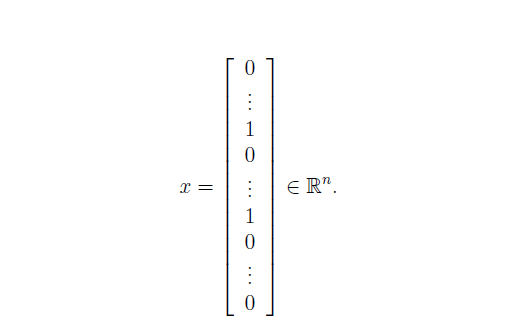
将上述经过处理的邮件表示成特征向量 , 其中 , 分别代表单词表中的 号单词是否出现在了邮件中。即我们需要把一封邮件转化为如下的向量形式:
完成emailFeatures.m如下:
function x = emailFeatures(word_indices)%EMAILFEATURES takes in a word_indices vector and produces a feature vector%from the word indices% x = EMAILFEATURES(word_indices) takes in a word_indices vector and% produces a feature vector from the word indices.% Total number of words in the dictionaryn = 1899;% You need to return the following variables correctly.x = zeros(n, 1);% ====================== YOUR CODE HERE ======================% Instructions: Fill in this function to return a feature vector for the% given email (word_indices). To help make it easier to% process the emails, we have have already pre-processed each% email and converted each word in the email into an index in% a fixed dictionary (of 1899 words). The variable% word_indices contains the list of indices of the words% which occur in one email.%% Concretely, if an email has the text:%% The quick brown fox jumped over the lazy dog.%% Then, the word_indices vector for this text might look% like:%% 60 100 33 44 10 53 60 58 5%% where, we have mapped each word onto a number, for example:%% the -- 60% quick -- 100% ...%% (note: the above numbers are just an example and are not the% actual mappings).%% Your task is take one such word_indices vector and construct% a binary feature vector that indicates whether a particular% word occurs in the email. That is, x(i) = 1 when word i% is present in the email. Concretely, if the word 'the' (say,% index 60) appears in the email, then x(60) = 1. The feature% vector should look like:%% x = [ 0 0 0 0 1 0 0 0 ... 0 0 0 0 1 ... 0 0 0 1 0 ..];%%x(word_indices) = 1;% =========================================================================end
2.3 Training SVM for spam classification
训练集中提供了4000封非垃圾邮件和4000封垃圾邮件。而测试集中则有1000封邮件用于测试。
在ex6_spam.m中使用SVM进行训练,并进行测试,分别输出训练集和测试集分类的准确率:
%% =========== Part 3: Train Linear SVM for Spam Classification ========% In this section, you will train a linear classifier to determine if an% email is Spam or Not-Spam.% Load the Spam Email dataset% You will have X, y in your environmentload('spamTrain.mat');fprintf('\nTraining Linear SVM (Spam Classification)\n')fprintf('(this may take 1 to 2 minutes) ...\n')C = 0.1;model = svmTrain(X, y, C, @linearKernel);p = svmPredict(model, X);fprintf('Training Accuracy: %f\n', mean(double(p == y)) * 100);%% ================= Part 5: Top Predictors of Spam ====================% Since the model we are training is a linear SVM, we can inspect the% weights learned by the model to understand better how it is determining% whether an email is spam or not. The following code finds the words with% the highest weights in the classifier. Informally, the classifier% 'thinks' that these words are the most likely indicators of spam.%% Sort the weights and obtin the vocabulary list[weight, idx] = sort(model.w, 'descend');vocabList = getVocabList();fprintf('\nTop predictors of spam: \n');for i = 1:15fprintf(' %-15s (%f) \n', vocabList{idx(i)}, weight(i));endfprintf('\n\n');fprintf('\nProgram paused. Press enter to continue.\n');pause;
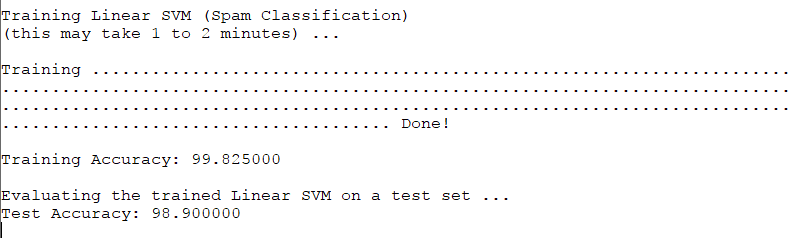
结果如上图,正确率分别高达99.8%和98.9%。
2.4 Top predictors for spam
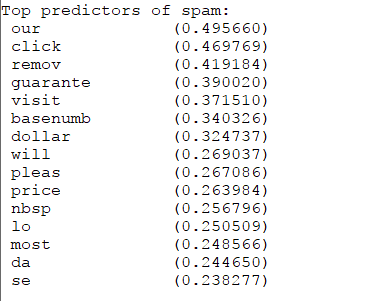
经过训练我们发现上述单词对分辨是否是垃圾邮件的帮助效果最明显。
2.5 Optional(ungraded) exercise: Try your own emails
使用spamSample1.txt中的垃圾邮件样例,在ex6_spam中测试:
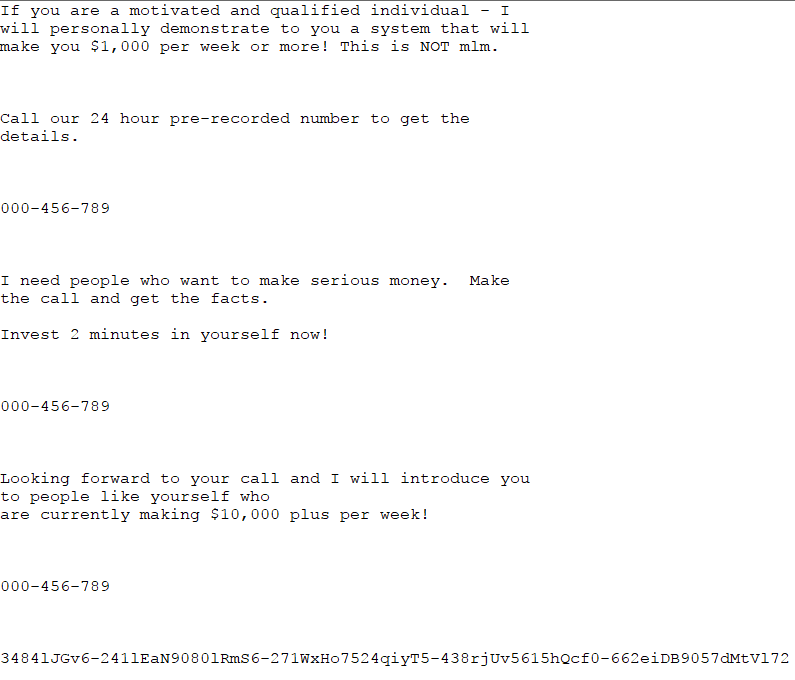
检验结果:
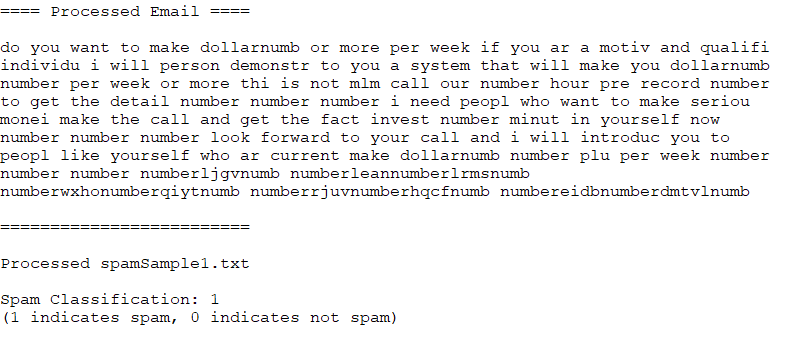
判断是垃圾邮件,正确。
再找一封非垃圾邮件(这里使用emailSample2.txt),如下:
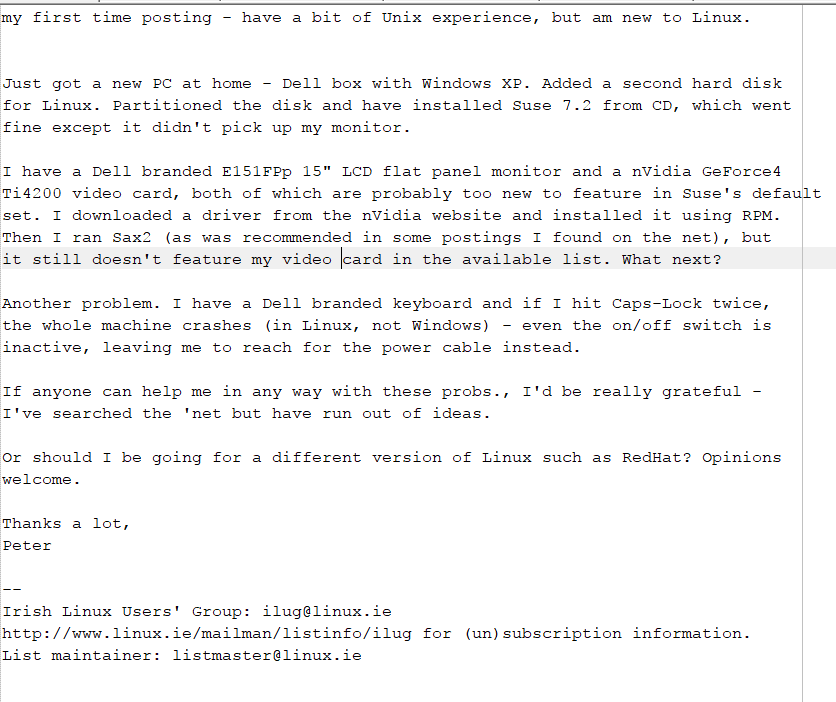
检验结果:
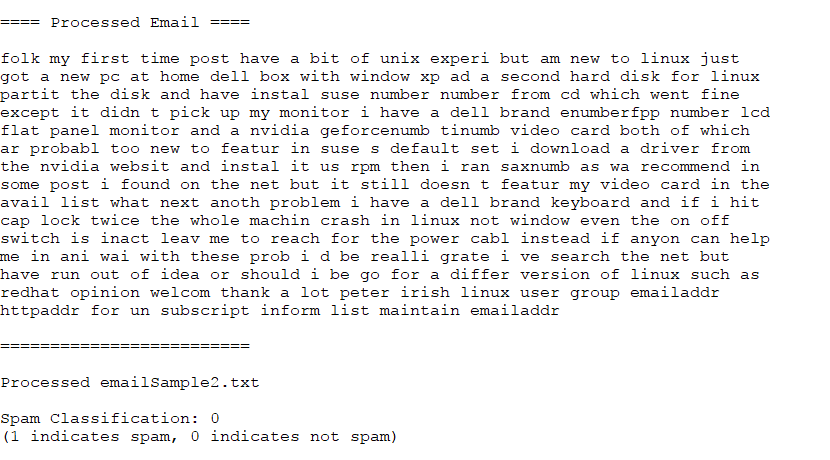
判断不是垃圾邮件,正确。
2.6 Optional(ungraded) exercise: Build up your own dataset
可以在SpamAssassin Public Corpus下载到数据集自行训练。也可以根据自己的数据集中的高频单词,建立新的单词表。还可以使用高度优化的SVM工具箱,如LIBSVM,点击这里可以下载。
